Using the Cartesian coordinate system in a Processing sketch
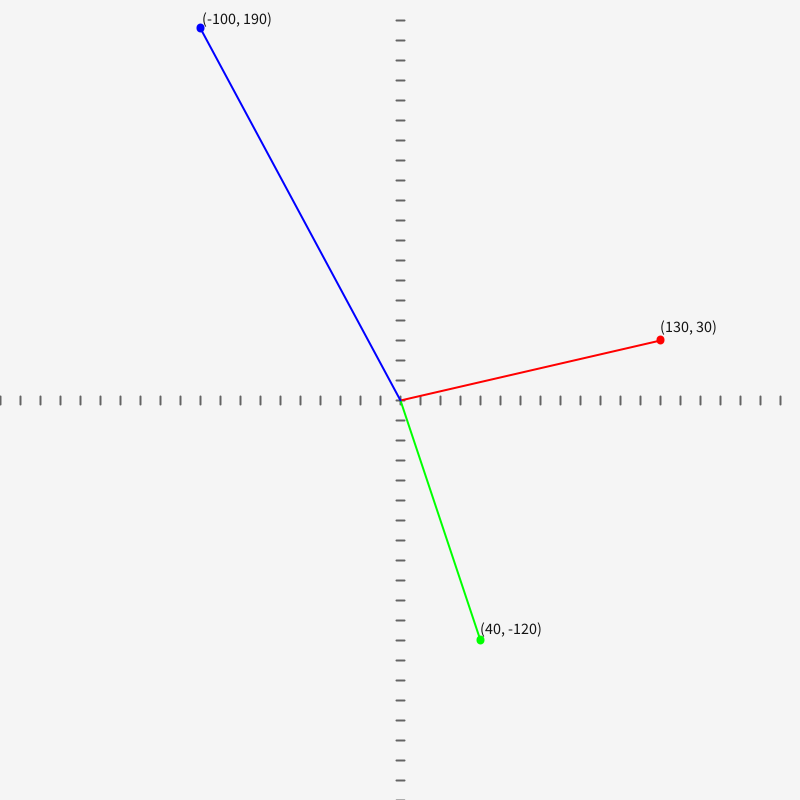
A test to see if it’s possible to use the Cartesian coordinate system in a Processing sketch.
Related to notes / The Processing coordinate system.
size(400, 400);
background(245);
fill(20);
textSize(8);

stroke(100);


translate(width/2, height/2);
scale(1, -1);  // flip the y-axis

for (int x=-width/2; x<width/2; x+=10) {
  line(x, -2, x, 2);
}

for (int y=-height/2; y<height/2; y+=10) {
  line(-2, y, 2, y);
}

strokeWeight(4);
stroke(255, 0, 0);
point(130, 30);
strokeWeight(1);
line(130, 30, 0, 0);
pushMatrix();
scale(1, -1);
// the extra call to translate() can be removed by using the negative y value;
// e.g., text("foo", 130, -34)
translate(0, -34 * 2);
text("(130, 30)", 130, 34);
popMatrix();

strokeWeight(4);
stroke(0, 255, 0);
point(40, -120);
strokeWeight(1);
line(40, -120, 0, 0);
pushMatrix();
scale(1, -1);
translate(0, 116 * 2);
text("(40, -120)", 40, -116);
popMatrix();

strokeWeight(4);
stroke(0, 0, 255);
point(-100, 186);
strokeWeight(1);
line(-100, 186, 0, 0);
pushMatrix();
scale(1, -1);
// note: this is overly complicated
// see comment above
translate(0, -188 * 2);
text("(-100, 190)", -100, 188);
popMatrix();


//save("processing_coordinates_translated.png");
It works. The trick is to use translate() and
scale()
. Other than dealing with text, it seems straightforward. I’ve got the sense I’m not fully thinking this through though.
Tags: