Hello htmx (part two)
Making a GET request from an anchor tag with htmx. Can it be done?
Continued from notes / Hello htmx.
Code: https://github.com/scossar/hello_htmx
Trigger a GET request to an API route by clicking on a link #
todo: Generate summary fragments for empty top-level headings.
The following sections outline how to use htmx to make AJAX requests when anchor elements are clicked.
The initial HTML #
The goal is to update the following code so that clicking the link triggers a GET request that returns the HTML fragment. (The server is already configured to handle the request.)
<!doctype html>
<html lang="en">
  <head>
    <meta charset="UTF-8" />
    <meta name="viewport" content="width=device-width, initial-scale=1.0" />
    <meta name="htmx-config" content='{"selfRequestsOnly": false}' />
    <link rel="stylesheet" href="/css/main.css" />
    <script src="/js/htmx.min.js" defer></script>
    <title>Hello htmx</title>
  </head>
  <body>
    <div class="wrap">
      <h1>Hello htmx</h1>
      <p>
        <!-- instead, make a GET request to http://localhost:8000/fragment/572 -->
        <a
          href="http://localhost:1313/notes/link-render-hooks/#the-components-of-a-markdown-link"
          >The components of a markdown link</a
        >
      </p>
    </div>
  </body>
</html>
Make an AJAX GET request with hx-get #
This works:
<p>
  <a
    hx-get="http://localhost:8000/fragment/572"
    hx-target="#link-results"
    href=""
    >The components of a markdown link</a
  >
</p>
<div id="link-results"></div>
Convert HTML anchors with the hx-boost attribute #
The htmx docs’ (
https://htmx.org/docs/#boosting
) “Boosting”
section outlines how to “boost” regular HTML anchors and forms with the
hx-boost
attribute:
<div hx-boost="true">
  <a href="/blog">Blog</a>
</div>
“Boosting” means that the element will trigger an AJAX request.
For anchor tags, clicking the anchor will trigger a GET request to the href attributes URL.
hx-boost degrades gracefully if javascript isn’t enabled. (I like that, although it will be a bit
weird for my use case. See below.)
hx-boost is inherited from the parent element (see the example above), so it could be applied to
the whole page. For my planned use case I’ll only want to apply it to particular anchor elements on
the page.
This works:
<p>
  <a
    hx-boost="true"
    hx-target="#link-results"
    href="http://localhost:8000/fragment/572"
    >The components of a markdown link</a
  >
</p>
<div id="link-results"></div>
hx-boost and progressive enhancement #
For my admittedly weird use case, the progressive enhancement supplied by hx-boost might not be
ideal. The issue is that an HTML fragment is being returned from the request to http://localhost:8000/fragment/572, while the
same fragment can be accessed from the full HTML document it originates from at
http://localhost:1313/notes/link-render-hooks/#the-components-of-a-markdown-link.
So the non-javascript user will get something:
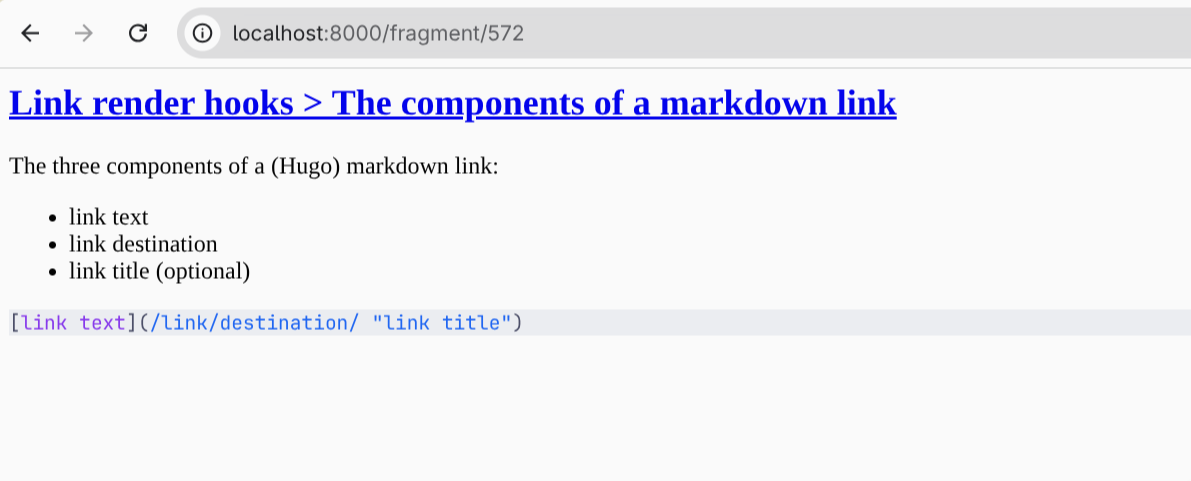
hx-boost with no js
But ideally they’d be getting the full source page:
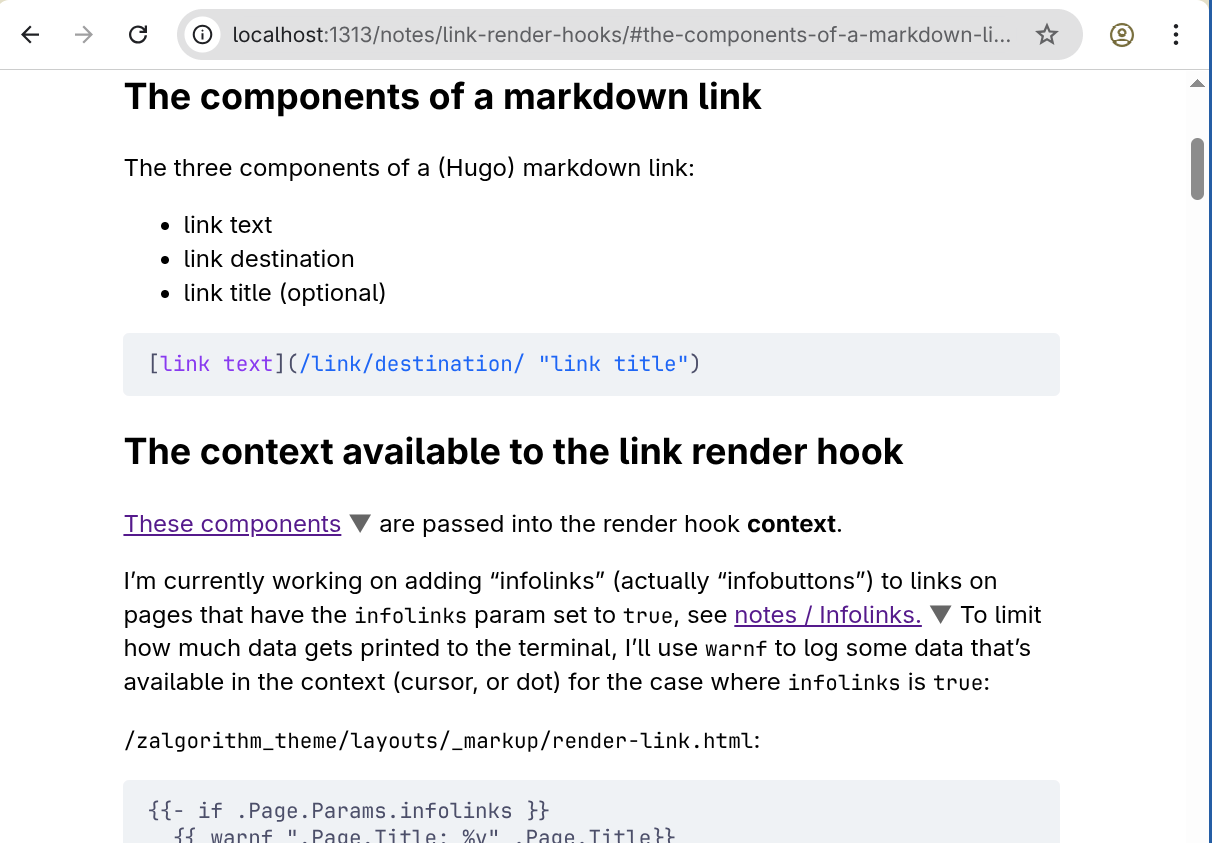
Progressive enhancement for links with hx-get #
For my use case, this seems like the best of both worlds:
<p>
  <a
    hx-get="http://localhost:8000/fragment/572"
    hx-target="#link-results"
    href="http://localhost:1313/notes/link-render-hooks/#the-components-of-a-markdown-link"
    >The components of a markdown link</a
  >
</p>
<div id="link-results"></div>
With javascript enabled, an AJAX request is made to the API route. Without javascript, the browser makes an HTTP GET request to the full webpage.
Toggling the target area open and closed #
The goal is to allow the hx-target element to be removed (css: display: none;) with a button click,
but rather than have subsequent clicks on the link make new requests to the API server, just use those clicks to toggle the display state of the hx-target.
A button that toggles its parent’s class #
First, prepend a button that toggles its parent’s hidden class to the HTML that’s returned from the server:
@app.get("/fragment/{row_id}", response_class=HTMLResponse)
async def get_fragment(
    row_id, db: aiosqlite.Connection = Depends(get_db_connection, scope="function")
):
    cursor = await db.execute(
        f"SELECT html_heading, html_fragment FROM sections WHERE id = {row_id}"
    )
    row = await cursor.fetchone()
    if row:
        # add a button that toggles the 'hidden' class to the HTML:
        return f"<button onclick='this.parentNode.classList.toggle(\"hidden\");'>x</button>{row[0]}{row[1]}"
    else:
        return "<p>Something went wrong</p>"
Hide an element with CSS #
A bit of CSS on the client:
.hidden {
  display: none;
}
Use htmx trigger modifiers to prevent multiple requests from being made from an element #
Limit htmx to making a single API request by adding the once
modifier
to the
hx-trigger attribute
. Note that without the hx-trigger attribute, the link would respond to the “click” event (its “natural” event), but if the hx-trigger attribute is added, its value needs to be "click once", not "once" — see:
notes / Trial and error.
hx-trigger="click once"
Execute some javascript after an AJAX request has completed #
Remove the "hidden" class from the hx-target if it’s been set.
This uses the
hx-on* attribute
with the
htmx:afterRequest event
(I’m going to have a lot of links to fix if their docs get updated.)
hx-on::after-request=" const target = document.getElementById('link-results');
this.onclick = function() { target.classList.remove('hidden'); };
Putting it all together #
<body>
  <div class="wrap">
    <h1>Hello htmx</h1>
    <p>
      <a
        hx-get="http://localhost:8000/fragment/572"
        hx-target="#link-results"
        hx-trigger="click once"
        hx-on::after-request="
        const target = document.getElementById('link-results');
        this.onclick = function() {
          target.classList.remove('hidden');
        };
        "
        href="http://localhost:1313/notes/link-render-hooks/#the-components-of-a-markdown-link"
        >The components of a markdown link</a
      >
    </p>
    <div id="link-results"></div>
  </div>
</body>
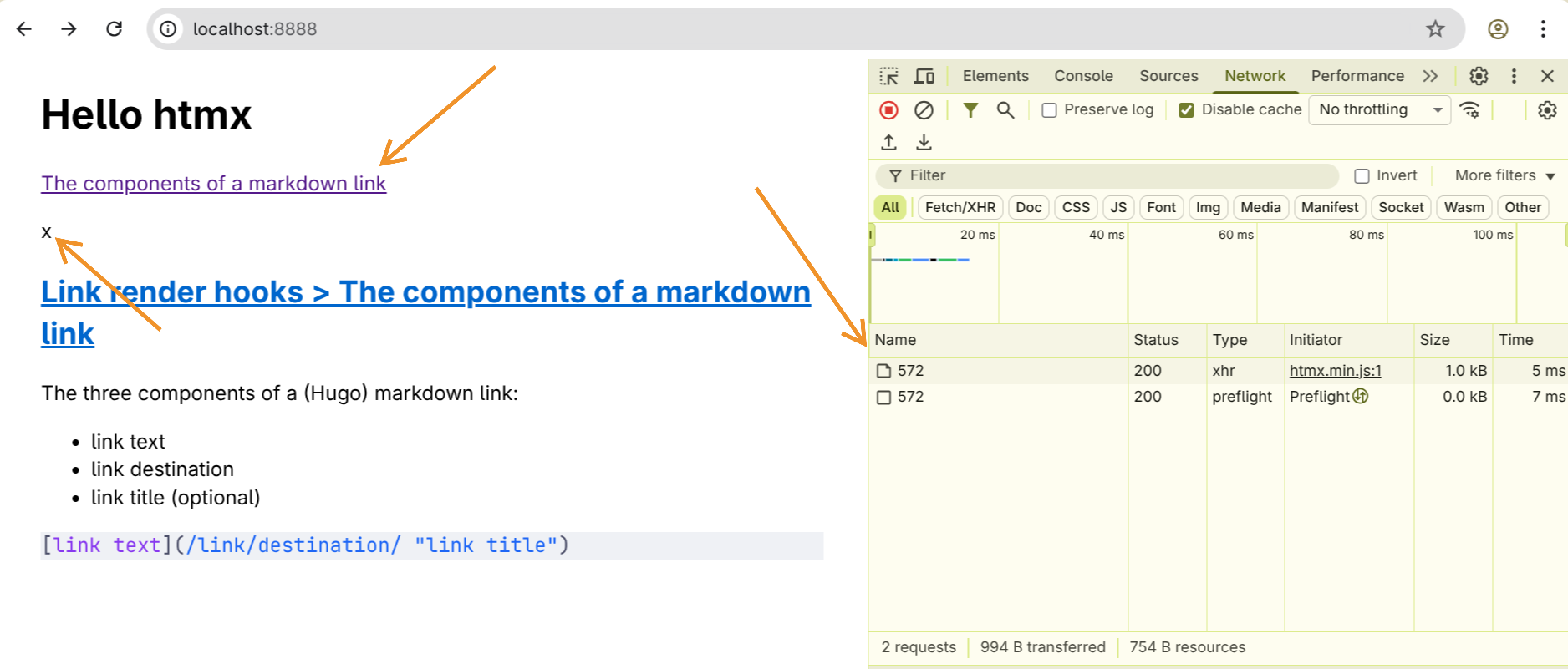
Footnote: how does htmx make AJAX requests? #
What is AJAX? #
What is AJAX? “AJAX stands for Asynchronous JavaScript and XML basically it is a XHR(XMLHttpRequest) call with send[s] our request in [the] background without loading the whole page.”1
“In summary, all AJAX GET requests are HTTP GET requests, but not all HTTP GET requests are AJAX requests. The ‘AJAX’ part describes how and when the request is made (asynchronously via JavaScript) rather than the nature of the request itself.”2
“With Ajax, web applications can send and retrieve data from a server asynchronously (in the background) without interfering with the display and behaviour of the existing page. By decoupling the data interchange layer from the presentation layer, Ajax allows web pages and, by extension, web applications, to change content dynamically without the need to reload the entire page.”3
“Ajax is not a technology, but rather a programming pattern.”4 Related to this, I don’t think AJAX implies that the XMLHttpRequest API is being used for the request.
What is an XMLHttpRequest? #
XMLHttpRequest (XHR) is an API in the form of a JavaScript object. The object has methods that transmit HTTP requests from a web browser to a web server.5
For example:
const request: XMLHttpRequest = new XMLHttpRequest();

// call the "open" method:
request.open('GET', '/api/message', true /* asynchronous */);

// for asynchronous requests, set a listener that will be notified when the request's state changes:
request.onreadystatechange = listener;

// initiate the request:
request.send();

// respond to state changes in the listener
function listener(request: XMLHttpRequest): void {
    // readyState 4 means the request is completed:
    if (request.readyState === 4 && request.status === 200) {
        console.log(request.responseText); // Display the text.
    }
}
What is the Fetch API? #
“The Fetch API provides an interface for fetching resources (including across the network). It is
more a powerful and flexible replacement for XMLHttpRequest.”6
The Fetch API uses Request and Response objects. Probably the most relevant thing for what I’m
looking at is that the Fetch API returns a Promise that resolves to the Response to a Request.
htmx uses the XMLHttpRequest API (for now) #
See https://htmx.org/essays/the-fetchening/ .
In htmx 4.0, fetch() is going to replace XMLHttpRequest. An alpha release of htmx 4.0 is
available now. The (non-alpha) release is planned for “early-to-mid 2026.” 4.0 will be marked as
latest in “early-2027ish”. I don’t think any of the effects what I’m doing.
Related #
References #
htmx.org. “htmx docs.” https://htmx.org/docs/
htmx.org. “htmx 4: The fetch()ening.” https://htmx.org/essays/the-fetchening/ .
Wikipedia Contributors. “Ajax (programming).” Last updated: November 20, 2025. https://en.wikipedia.org/wiki/Ajax_(programming) .
Wikipedia Contributors. “XMLHttpRequest.” Last updated: October 21, 2025. https://en.wikipedia.org/wiki/XMLHttpRequest .
Mozilla Developers. “Fetch API.” Accessed on: January 12, 2026. https://developer.mozilla.org/en-US/docs/Web/API/Fetch_API .
-
Shahrukh Alam, “ASP.NET Core ‘AJAX’ using jQuery,” November 25, 2019, https://medium.com/@shahrukhalam_35790/asp-net-core-ajax-using-jqurey-a6cc24e8c2cb . ↩︎
-
Google AI, In response to “what’s the difference between an AJAX GET request and an HTTP GET request?” January 12, 2026. ↩︎
-
Wikipedia Contributors, “Ajax (programming),” Last updated: November 20, 2025, https://en.wikipedia.org/wiki/Ajax_(programming) . ↩︎
-
Wikipedia Contributors, “Ajax (programming),” Last updated: November 20, 2025, https://en.wikipedia.org/wiki/Ajax_(programming) . ↩︎
-
Wikipedia Contributors, “XMLHttpRequest,” Last updated: October 21, 2025, https://en.wikipedia.org/wiki/XMLHttpRequest . ↩︎
-
Mozilla Developers, “Fetch API,” Accessed on: January 12, 2026, https://developer.mozilla.org/en-US/docs/Web/API/Fetch_API . ↩︎