Hello FastAPI
Notes related to the FastAPI tutorials and documentation.
Python types intro #
This section is based on https://fastapi.tiangolo.com/python-types/ . Read that instead of this.
Python has support for optional type hints (type annotations).
The motivation that’s given for using types seems to be largely that they help with IDE autocompletion. I turn autocompletion on from time to time…
E.g.:
def get_full_name(first_name, last_name):
    full_name = first_name.title() + " " + last_name.title()
    return full_name


print(get_full_name("john", "doe"))

def full_name(first_name: str, last_name: str):
    return first_name.title() + " " + last_name.title()
With the type annotations in the second function, Neovim was able to provide better autocomplete
suggestions, because it knew that first_name and last_name were strings.
Type annotations also allows for better error checking:
def get_name_with_age(name: str, age: int):
    return name + " is " + age + " years old."  # operator "+" is not supported for types "str" and "int"
Python built in types #
See https://docs.python.org/3/library/stdtypes.html
“The principal built-in types are numerics, sequences, mappings, classes, instances and exceptions.”
Numerics:
intfloatcomplex, i.e.3+4ibool(True/False, technically a subtype ofint)
Sequences:
list(mutable[1, 2, 3])tuple(immutable(1, 2, 3))str("hello")bytesandbytearray(binary data)range(for generating number sequences)
Mappings:
dict(dictionaries:{"foo": "bar"})
Classes:
Classes are the blueprints for creating objects. Every type in Python is actually a class. (So the
methods that can be called on a string are the class methods for the type str.) When you define
class MyClass:, you’re creating a new type.
Instances:
Instances are the actual objects created from classes. When you write x = MyClass(), x is an
instance of MyClass.
Exceptions:
Exceptions are the types used for error handling:
-
Exception,ValueError,TypeError,KeyError, etc. -
They are raised when something goes wrong and can be caught with
try/except.
Generic types with type parameters #
Data structures like dict, list, set, and tuple contain other values. These internal values
have their own types. These are called container classes.
Generic types are types that can be parameterized, (like the types I listed above):
https://docs.python.org/3/glossary.html#term-generic-type
GenericAlias objects are generally created by subscripting a class. Note that GenericAlias
objects were introduced in Python 3.9. They are created by parameterizing a generic type:
In [1]: type(list[int])
Out[1]: types.GenericAlias
The GenericAlias object was added in Python 3.9 to allow built-in types to be directly
parameterized without importing from typing:
# before 3.9, you needed
from typing import List, Dict
def process(items: List[str]) -> Dict[str, int]:
    ...
Note: it’s generally only possible to subscript a class if the class implements the special method
__class_getitem__(). I’m noting that because I see errors related to __get_item__ from time to
time.
To define a GenericAlias for a dict, pass 2 type parameters:
def pricess_items(prices: dict[str, float]):
    for item_name, item_price in prices.items():
        ...
Type unions #
A variable can be declared as having multiple acceptable types (in Python > 3.6) by using a Union type:
def process_item(item: int | str):
    ...
def say_hi(name: str | None):
    print(f"Hi {name}")
Pydantic models #
Pydantic is a Python library to perform data validation: https://docs.pydantic.dev/latest/ . You declare the shape of the data as classes with attributes:
from datetime import datetime
from pydantic import BaseModel


class User(BaseModel):
    id: int
    name: str = "Foo Bar"
    signup_ts: datetime | None = None
    friends: list[int] = []


user_data = {"id": "1", "signup_ts": "2025-11-27", "friends": [2, 3, 34]}

user = User(**user_data)

print(user)
# id=1 name='Foo Bar' signup_ts=datetime.datetime(2025, 11, 27, 0, 0) friends=[2, 3, 34]
Python type hint annotations #
Python allows putting additional metadata in type hints:
def say_hello(name: Annotated[str, "The name to say hello to"]) -> str:
    return f"Hello {name}"
Annotations don’t seem to be doing anything with how I’ve got Neovim configured though.
Concurrency and async / await #
Note: this section is (largely) based on https://fastapi.tiangolo.com/async/ . Read that instead of this.
Modern versions of python support asynchronous code using “coroutines”, with async and await
syntax.
Support for asynchronous code means that Python has a way to tell the computer that at some point in the code it will have to wait for something else to finish. During that time, the computer can do other work.
It’s called “asynchronous” because the computer / program doesn’t have to be “synchronized” with the slow task, waiting for the exact moment that the task finishes, while doing nothing, to be able to take the task result and continue the work.
Think of synchronous (the opposite of asynchronous) as sequential — the computer / program follows all steps in a sequence before switching to a new task.
Python coroutines #
When you mark a function as async it becomes a coroutine that returns a coroutine object when it’s
called.
The key mechanism is the event loop. The event loop manages and schedules coroutines,
deciding when each one runs. When a coroutine executes an await expression, it yields control back
to the event loop. The event loop cah run other coroutines while the first one waits for something,
e.g., waits for some I/O operation.
Concurrency vs parallelism #
The analogy from the FastAPI docs is good ( https://fastapi.tiangolo.com/async/#concurrency-and-burgers ).
Think of concurrency as a fast food restaurant with a single cashier where you’re given a number after placing an order. Think of parallelism as a fast food restaurant with multiple cashiers where you wait at the checkout after placing your order.
Concurrency makes sense for web APIs — handling the case of many users making requests. Concurrency makes sense for applications where there’s a lot of waiting, e.g., waiting for an external process to finish.
Parallelism makes sense for applications that are CPU bound — lots of work to be done, not much waiting. CPU bound applications might be: audio processing, machine learning, etc.
async and await #
Modern versions of python support async and await. When there’s an operation that will require
waiting:
burgers = await get_burgers(2) # `await` can only be used in async functions
burgers is now a coroutine object.
await can only be used when calling a function that’s been defined with async def: functions
that return a coroutine object:
async def get_burgers(number: int):
    # do some asynchronous things, e.g.:
    burgers = await make_burgers(number)
    return burgers
First FastAPI app #
from fastapi import FastAPI

app = FastAPI()


@app.get("/")
async def root():
    return {"message": "Hello world"}
Starting the FastAPI server #
fastapi dev main.py
Or for my current case:
fastapi dev file_to_run.py
Create a FastAPI instance #
from fastapi import FastAPI

app = FastAPI()  # type: <class 'fastapi.applications.FastAPI'>
Create a path operation and define a path operation function #
While building an API, the “path” is the main way to separate “concerns” and “resources”.
“Resources” are the different things that an application deals with: users, posts, search responses, etc.
“Concerns” is about the idea of separation of concerns: use the URL structure to organize what the API does:
/users          # User resource
/users/{id}     # Specific user
/posts          # Post resource
/posts/{id}     # Specific post
/orders         # Order resource
FastAPI uses decorators to define the operation and path of a function. E.g.:
/(path)get(operation)
Becomes the decorator: @app.get("/").
A decorator is a function that wraps another function to modify its behavior. When you call
@app.get("/")
async def root():
    return {"message": "Hello world"}
Python is essentially doing:
async def root():
    return {"message": "Hello world"}

root = app.get("/")(root)
So @app.get("/") is calling app.get("/") which returns a decorator function and that function
wraps the root function.
Path parameters #
@app.get("/")
async def root():
    return {"message": "Hello world"}


@app.get("/items/{item_id}")
async def read_item(item_id):
    return {"item_id": item_id}


@app.get("/numeric_items/{item_id}")
async def read_int_item(item_id: int):  # path parameter with type
    return {"item_id": item_id}
Note that the type set for item_id in read_int_item performs automatic type conversion (from
string to int) and data validation:
❯ curl http://localhost:8000/numeric_items/foo
{"detail":[{"type":"int_parsing","loc":["path","item_id"],"msg":"Input should be a valid integer,
unable to parse string as an integer","input":"foo"}]}
Order of path definitions is significant #
Path operations are evaluated in order, so this is correct, not the other way around:
@app.get("/users/me")
async def read_user_me():
    return {"user_id": "current_user_id"}


@app.get("/users/{user_id}")
async def read_user(user_id: str):
    return {"user_id": user_id}
Predefined parameter values #
If you want possible valid path parameters to be predefined, use a Python Enum. E.g., create an
Enum class that inherits from str and Enum. By inheriting from str the API docs will be able
to know that the values must be of type string:
from fastapi import FastAPI
from enum import Enum


class ModelName(str, Enum):
    alexnet = "alexnet"
    resnet = "resnet"
    lenet = "lenet"


app = FastAPI()


@app.get("/models/{model_name}")
async def get_model(model_name: ModelName):
    if model_name is ModelName.alexnet:
        return {"model_name": model_name, "message": "should be alexnet"}
    # the `value` method also works
    if model_name.value == "lenet":
        return {"model_name": model_name, "message": "should be lenet"}

    return {"model_name": model_name, "message": "can only be resnet"}
Query parameters #
When parameters are declared in an operation function that are not part of the path parameters, they are automatically interpreted as query parameters:
fake_items_db = [
    {"item_name": "Foo"},
    {"item_name": "Bar"},
    {"item_name": "Baz"},
]

@app.get("/items_from_db/")
async def read_items_from_db(skip: int = 0, limit: int = 10):
    return fake_items_db[skip : skip + limit]
❯ curl "http://localhost:8000/items_from_db/?skip=2&limit=2"
[{"item_name":"Baz"}]
Note that the query params are naturally strings, but when they’re declared with Python types, they are converted to the type and validated against it.
Declare optional query parameters by setting their default to None:
@app.get("/foo/{foo_id}")
async def get_foo(foo_id: str, q: str | None = None):
    if q:
        return {"foo_id": foo_id, "q": q}
    return {"foo_id": foo_id}
projects/python/hello_fastapi via v3.11.13 (.ftutenv)
❯ curl http://localhost:8000/foo/3?q=four
{"foo_id":"3","q":"four"}
projects/python/hello_fastapi via v3.11.13 (.ftutenv)
❯ curl http://localhost:8000/foo/3
{"foo_id":"3"}
boolean query parameters #
Query parameters with a bool type will be converted from strings to booleans:
async def read_item(item_id: str, q: str | None = None, short: bool = False):
    ...
The above function would convert any (?) value of short to True (?). That doesn’t seem right.
I’m guessing that some string values get converted to False, e.g., "False", "0", but I’ll test
that later.
Required query parameters #
To make a query parameter required, just don’t set an optional value for it:
@app.get("/needy_items/{item_id}")
async def read_user_item(item_id: str, needy: str):
    item = {"item_id": item_id, "needy": needy}
    return item
It will return an error if the param is missing:
❯ curl "http://localhost:8000/needy_items/foo"
{"detail":[{"type":"missing","loc":["query","needy"],"msg":"Field required","input":null}]}
Sending data to the API in the request body #
A request body is sent by the client to the API. A response body is data sent by the API to the client.
To declare a request body, use Pydantic models:
from fastapi import FastAPI
from pydantic import BaseModel

# Declare the data model as a class that inherits from `BaseModel`
class Item(BaseModel):
    name: str
    description: str | None = None  # when an attribute has a default value, it's not required
    price: float
    tax: float | None = None


app = FastAPI()

@app.post("/items/")
# To add the parameter to the path operation, declare it in the same way as with query parameters:
async def create_item(item: Item):
    return item
FastAPI will:
- read the body of the request as JSON
- if needed, convert types
- validate the data
- populate the parameter with the received data
❯ curl -X POST "http://localhost:8000/items/" -H "Content-Type: application/json" -d '{"name": "Foo", "description": "Footastic item", "price": 17.99, "tax": 3.5}'
{"name":"Foo","description":"Footastic item","price":17.99,"tax":3.5}
The attributes of the model can be accessed directly in the operation function:
@app.post("/items/")
async def create_item(item: Item):
    # `model_dump()` (a Pydantic function):
    # Generate a dictionary representation of the model, optionally specifying which fields to include or exclude:
    item_dict = item.model_dump()
    if item.tax is not None:
        price_with_tax = item.price + item.tax
        item_dict.update({"price_with_tax": price_with_tax})
    return item_dict
❯ curl -X POST "http://localhost:8000/items/" -H "Content-Type: application/json" -d '{"name": "Foo", "description": "Footastic item", "price": 17.99, "tax": 3.5}'
{"name":"Foo","description":"Footastic item","price":17.99,"tax":3.5,"price_with_tax":21.49}
Request body with path parameters #
FastAPI recognized that function parameters that match path parameters should be taken from the path. E.g.:
@app.put("/items/{item_id}")
async def update_item(item_id: int, item: Item):
    # item_id will be taken from the path
    # item will be an instance of Item, populated by the request body
Request body + path + query parameters also works as expected.
Query parameter validation #
See https://fastapi.tiangolo.com/tutorial/query-params-str-validations/ The code before adding validations:
Note: Following the tutorial, I’m getting type warnings without explicitly annotating results as a dict.
This approach works:
@app.get("/items/")
async def read_items(q: str | None = None):
    # I'd do almost anything to avoid this:
    results: dict[str, list[dict[str, str]] | str] = {
        "items": [{"item_id": "Foo"}, {"item_id": "Bar"}]
    }
    if q:
        results.update({"q": q})
    return results

# But that type of annotation is over-the-top. I prefer this approach:

@app.get("/bikes/")
async def read_bikes(q: str | None = None):
    results = {"bikes": [{"brand": "kona"}, {"brand": "norco"}]}
    if q:
        # This is a cleaner approach using dictionary unpacking
        results = {**results, "q": q}
    return results
Enforce a max_length on the q parameter #
Annotated can be used to add metadata to parameters. With defining the q parameter as
Annotated, Query can now be added inside of Annotated to set a max_length:
from fastapi import FastAPI, Query
from typing import Annotated

app = FastAPI()


@app.get("/items/")
async def read_items(q: Annotated[str | None, Query(max_length=10)] = None):
    results: dict[str, list[dict[str, str]] | str] = {
        "items": [{"item_id": "Foo"}, {"item_id": "Bar"}]
    }
    if q:
        results.update({"q": q})
    return results
From fastapi/param_functions.py:
def Query(  # noqa: N802
    # ...
    max_length: Annotated[
        Optional[int],
        Doc(
            """
            Maximum length for strings.
            """
        ),
    # ...
Query is being used here because it’s a query parameter. There are similar validations for Path(), Body(),
Header(), and Cookie() that accept the same arguments as Query().
FastAPI will validate the data and return an error to the client if it’s not valid:
❯ curl "http://localhost:8000/items/?q=testingonetwo"
{"detail":[{"type":"string_too_long","loc":["query","q"],"msg":"String should have at most 10 characters","input":"testingonetwo","ctx":{"max_length":10}}]}
The parameter is also documented on the OpenAPI schema.
Available validations include:
min_lengthmax_lengthpattern(a regular expression)
E.g.: Query(min_length=3, max_length=50, pattern="^fixedquery$")
Allow a query parameter to receive multiple values #
I know what the docs are getting at, but the wording is hard to follow, see https://fastapi.tiangolo.com/tutorial/query-params-str-validations/#query-parameter-list-multiple-values .
@app.get("/multi-q/")
async def read_multi_q(q: Annotated[list[str] | None, Query()] = None):
    query_items = {"q": q}
    return query_items
❯ curl "http://localhost:8000/multi-q/?q=foo&q=bar"
{"q":["foo","bar"]}
I don’t think it’s possible to use Query() to receive a list of query params and also validate the
params with Query() (?), e.g. Query(max_length=3).
Note that this use case is often confusing, e.g, Discourse’s use of
tags[]=foo&tags[]=bar&tags[]=baz.
Custom validation #
Use the Pydantic AfterValidator method:
from fastapi import FastAPI, Query
from typing import Annotated
from pydantic import AfterValidator
import random

app = FastAPI()

data = {
    "isbn-9781529046137": "The Hitchhiker's Guide to the Galaxy",
    "imdb-tt0371724": "The Hitchhiker's Guide to the Galaxy",
    "isbn-9781439512982": "Isaac Asimov: The Complete Stories, Vol. 2",
}


def check_valid_id(id: str):
    if not id.startswith(("isbn-", "imdb-")):
        raise ValueError('Invalid ID format, it must start with "isbn-" or "imdb-"')
    return id

@app.get("/books/")
async def read_bookd(
    id: Annotated[str | None, AfterValidator(check_valid_id)] = None,
):
    if id:
        item = data.get(id)
    else:
        id, item = random.choice(list(data.items()))
    return {"id": id, "name": item}
❯ curl "http://localhost:8000/books/"
{"id":"isbn-9781529046137","name":"The Hitchhiker's Guide to the Galaxy"}
projects/python/hello_fastapi via v3.11.13 (.ftutenv)
❯ curl "http://localhost:8000/books/?id=imdb-tt0371724"
{"id":"imdb-tt0371724","name":"The Hitchhiker's Guide to the Galaxy"}
projects/python/hello_fastapi via v3.11.13 (.ftutenv)
❯ curl "http://localhost:8000/books/?id=imde-tt0371724"
{"detail":[{"type":"value_error","loc":["query","id"],"msg":"Value error, Invalid ID format, it must start with \"isbn-\" or \"imdb-\"","input":"imde-tt0371724","ctx":{"error":{}}}]}
Online API Documentation #
Browse to http://localhost:8000/docs:
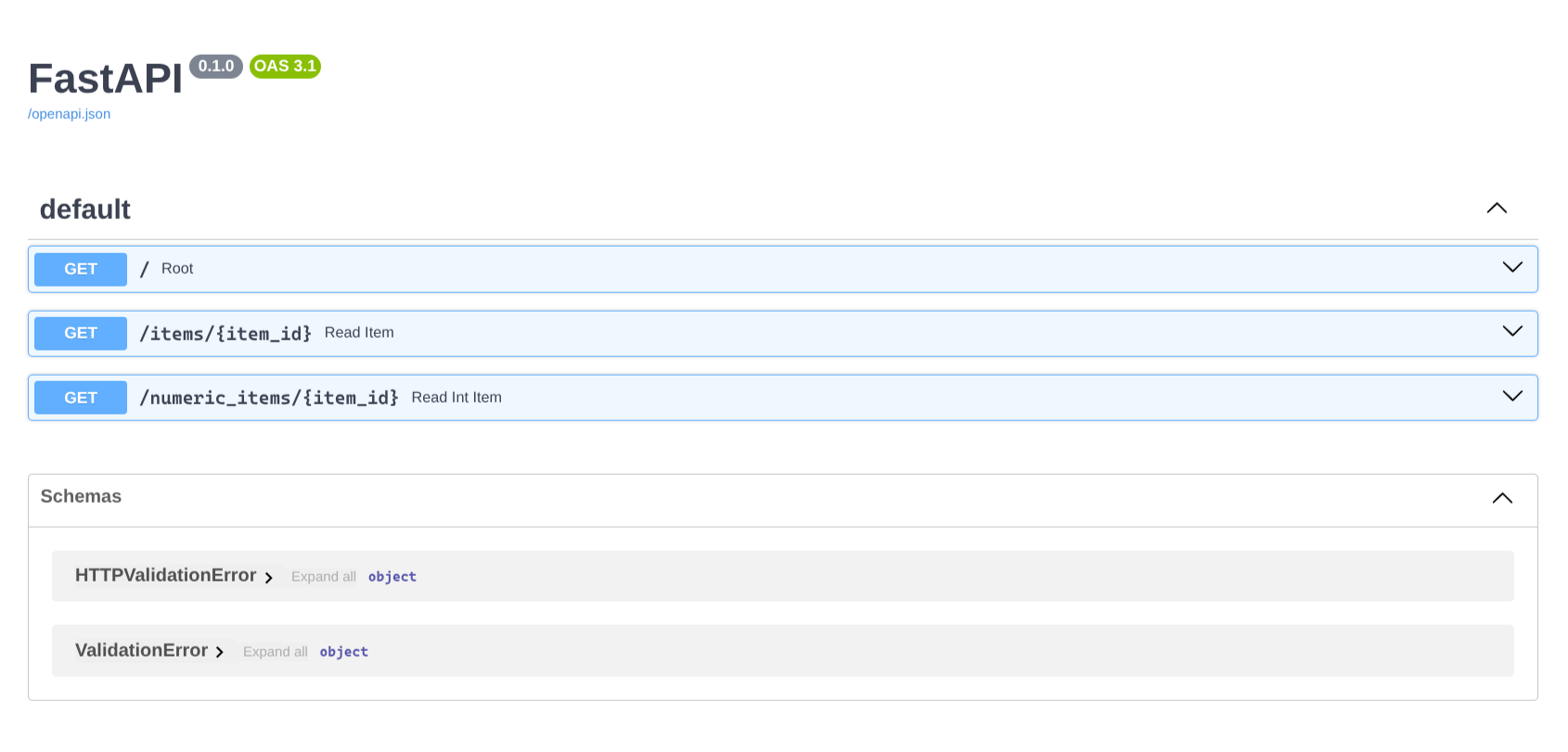
FastAPI generated API documentation